
Vite Image Optimizer
Plugin for Vite to optimize all images assets using Sharp.js and SVGO at build time.


Plugin for Vite to optimize all images assets using Sharp.js and SVGO at build time.
## Features - Optimize SVG assets using [SVGO](https://github.com/svg/svgo) and pass custom configs. - Optimize Raster assets (png, jpeg, gif, tiff, webp, avif) using [Sharp.js](https://github.com/lovell/sharp) with the option to pass custom configs for each extension type. - Option to process all assets from your `public` directory defined in the bundler. - Configure `test`, `include`, and `exclude` to filter assets. - Caching support to avoid re-optimization (optional) - Skips processing assets if their optimized size is greater than their original size. - Log the optimization stats showing the before and after size difference, ratio and total savings (optional) 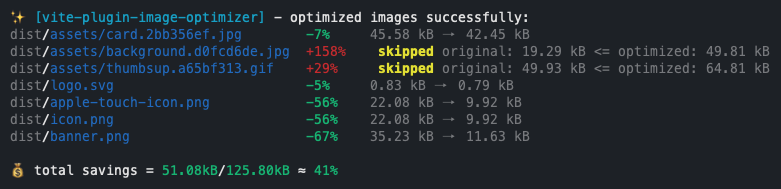 ## Motivation This plugin is based on the awesome [image-minimizer-webpack-plugin](https://github.com/webpack-contrib/image-minimizer-webpack-plugin) for Webpack. I wanted to combine the optimization capabilities of **Sharp.js** and **SVGO** in a single package and I couldn't find a plugin for Vite that could accomplish this. I initially thought of adding [squoosh](https://github.com/GoogleChromeLabs/squoosh) and [imagemin](https://github.com/imagemin/imagemin) support as well but dropped the idea since they are no longer maintained. If you find the plugin useful, consider showing your support by giving a ⭐ Contributions are most welcome! We follow [conventional-commits](https://www.conventionalcommits.org/en/v1.0.0/) ## Installation You can add it as a dev dependency to any of the package managers (NPM, Yarn, PNPM) Supports `Vite >=3` and `Node >=14` ```console npm install vite-plugin-image-optimizer --save-dev ``` > **Warning** > > `sharp` and `svgo` don't come installed as part of the package. You will have to install them manually and add it as a dev dependency. This is a design decision so you can choose to skip installing > `sharp` > if you only want to optimize svg assets using `svgo` and vice versa. > > ```console > npm install sharp --save-dev > ``` > > ```console > npm install svgo --save-dev > ``` ## Usage ```js import { ViteImageOptimizer } from 'vite-plugin-image-optimizer'; import { defineConfig } from 'vite'; export default defineConfig(() => { return { plugins: [ ViteImageOptimizer({ /* pass your config */ }), ], }; }); ``` ## Default Configuration The default configuration is made for lossless compression of image assets. ```js const DEFAULT_OPTIONS = { logStats: true, ansiColors: true, test: /\.(jpe?g|png|gif|tiff|webp|svg|avif)$/i, exclude: undefined, include: undefined, includePublic: true, svg: { multipass: true, plugins: [ { name: 'preset-default', params: { overrides: { cleanupNumericValues: false, cleanupIds: { minify: false, remove: false, }, convertPathData: false, }, }, }, 'sortAttrs', { name: 'addAttributesToSVGElement', params: { attributes: [{ xmlns: 'http://www.w3.org/2000/svg' }], }, }, ], }, png: { // https://sharp.pixelplumbing.com/api-output#png quality: 100, }, jpeg: { // https://sharp.pixelplumbing.com/api-output#jpeg quality: 100, }, jpg: { // https://sharp.pixelplumbing.com/api-output#jpeg quality: 100, }, tiff: { // https://sharp.pixelplumbing.com/api-output#tiff quality: 100, }, // gif does not support lossless compression // https://sharp.pixelplumbing.com/api-output#gif gif: {}, webp: { // https://sharp.pixelplumbing.com/api-output#webp lossless: true, }, avif: { // https://sharp.pixelplumbing.com/api-output#avif lossless: true, }, cache: false, cacheLocation: undefined, }; ``` ## Plugin Options - **[`test`](#test)** - **[`include`](#include)** - **[`exclude`](#exclude)** - **[`includePublic`](#includepublic)** - **[`logStats`](#logstats)** - **[`ansiColors`](#ansiColors)** - **[`svg`](#svg)** - **[`png`](#png)** - **[`jpeg`](#jpeg)** - **[`tiff`](#tiff)** - **[`gif`](#gif)** - **[`webp`](#webp)** - **[`avif`](#webp)** - **[`cache`](#cache)** - **[`cacheLocation`](#cache)** ### `test` Type: `RegExp` Default: `/\.(jpe?g|png|gif|tiff|webp|svg|avif)$/i` Test to match files against. ### `exclude` Type: `String` | `RegExp` | `Array